
BigOven Recipes & Meal Planner
BigOven.comFood & Drink
4.67.90K Reviews
- Version
- 6.2.31
- Installs
- 1.00M
- Age Rating
- Teen
Screenshots
Our Review of BigOven Recipes & Meal Planner
 Analysis by Appyee
I tend to reach for a recipe app when the question is not how to cook something impressive, but how to turn a few ordinary ingredients into dinner without wasting time. BigOven Recipes & Meal Planner is built for that kind of everyday decision: it brings recipes, meal organization, and shopping into one place. I find that combination most useful when I want a little structure but do not want cooking to feel like another complicated project.
Where a connection makes the biggest difference
Searching for ideas is one of the moments when connectivity matters most. If I have a particular ingredient in mind, browsing recipes around it can help me move past the same handful of meals I usually make. The community side can add another source of inspiration, too: recipes, comments, and ratings give me more context than a bare list of dish names.
That convenience also means the experience depends on being able to reach the content I want. I would browse and settle on a recipe before I start cooking, rather than assume every page or feature will be available in a spot with a weak signal. This is a practical habit for any recipe app whose main appeal is exploring a large collection: choose the dish while you have a reliable connection, then get your ingredients and workspace ready.
The same thinking applies to planning. I would build or review a meal plan before heading out, then check the shopping list before entering a store where reception may be unreliable. That small bit of preparation can prevent a useful digital list from becoming a distraction at the exact moment I need it.
Useful on the move, with a little preparation
BigOven is a natural fit for the short gaps in a busy day. I can imagine looking up dinner ideas on the commute home, checking what a recipe calls for before shopping, or reviewing a plan while deciding what to cook. Those are better moments to browse than when a pan is already hot and my hands are messy.
For a realistic weeknight, I might check the fridge before leaving work, use the available ingredients to narrow down dinner ideas, and add the chosen recipe to my plan. Before I shop, I would review the resulting list and remove anything I already have. That last check matters: an automatically assembled list is a helpful starting point, not a substitute for looking in the cupboards.
On a tablet or computer, meal planning may feel more comfortable if I am arranging several days at once; a phone makes more sense for quick checks and shopping. The original article describes syncing across devices, which is useful if I plan on one screen and refer to the result on another. I would still make sure I have the right plan and list open before relying on them while out.
What to do when a recipe or list is not handy
Cooking is an awkward time to troubleshoot an app. If a recipe page takes a while to load, I would avoid repeatedly tapping around with wet hands and instead pause, check the connection, and give it a moment. Better still, I would open the recipe and read through the ingredients and steps before starting. That simple routine also catches missing ingredients early, when changing plans is easy.
Meal plans and shopping lists are only useful when they reflect what I actually intend to cook. If I swap a dish at the last minute, I would revisit the list rather than assume it still matches the new plan. Likewise, after shopping, checking off or removing items keeps the list from becoming a record of several weeks’ worth of groceries. The app can help organize decisions, but the final check is still mine.
When a connection is poor, I would switch to a familiar recipe I already know rather than depend on finding a new one at the stove. I would not treat the app as a guaranteed offline cookbook. Planning ahead is the sensible workaround: choose the recipe, gather what it needs, and keep the cooking flow simple.
Keeping browsing and shopping focused
A large recipe collection can be inspiring, but it can also turn a quick dinner decision into a long scroll. I get more value from starting with a constraint: one ingredient that needs using, a meal type, or a dish I have time to make. That makes search more purposeful and keeps browsing from taking longer than cooking.
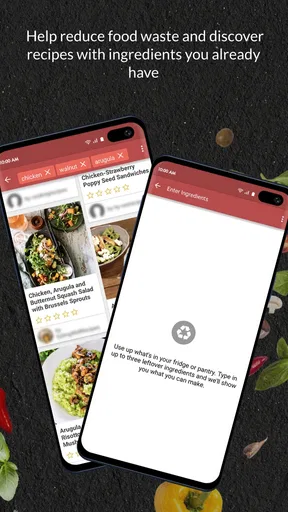
The leftover idea is especially useful when treated as a prompt rather than a promise. I would enter ingredients that genuinely need using, then check whether a suggested recipe also calls for staples I have on hand. A result may solve the main ingredient problem while still requiring a store trip, so it is worth reading the full ingredient list before committing.
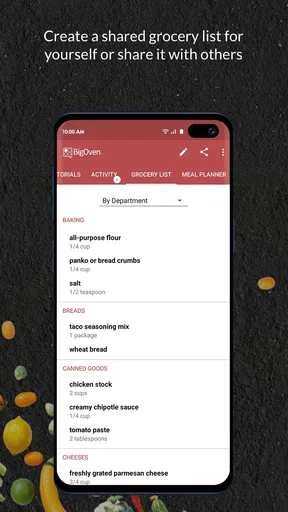
For shopping, I would use the generated list as a draft and edit it around the way I actually shop. Aisle grouping can make a trip easier to scan, but it does not know which items are already in my kitchen or whether I prefer a different substitute. Checking quantities and pantry supplies before leaving is a small step that can prevent duplicate purchases.
Who will get the most from it
I think BigOven is best for home cooks who regularly ask, “What can I make with this?” and want recipe discovery connected to weekly planning and groceries. It can also suit someone trying to cook at home more often, because having a plan and a list lowers the effort of deciding what to buy and prepare.
It is less compelling for a cook who already has a settled collection of recipes, a reliable paper routine, or a preferred grocery-list tool and does not want to manage another system. Someone who needs highly specialized nutrition tracking or strict dietary controls should check that the available recipe filters fit their needs before building a routine around them. And if a person mainly wants a cookbook that works without connectivity, this is not the choice I would make on that requirement.
Compared with searching the web for each meal, BigOven’s appeal is the connection between finding a recipe and organizing it into a plan or list. A notes app or paper planner may be faster for someone who already knows exactly what to cook, but it will not offer the same recipe-browsing and community context in one cooking-focused place. The trade-off is that an all-in-one approach asks me to keep the plan and list current instead of scattering decisions across several tools.
Getting Started with BigOven
First things first, downloading BigOven is a breeze. Available on both Android and iOS, you can have it up and running in no time. Once you’re in, the clean and intuitive interface welcomes you. You don’t need a PhD in app navigation to figure things out. The layout is straightforward, making it easy to dive right into the features.
BigOven is a free food and drink app from BigOven.com, with optional in-app purchases ranging from $2.99 to $59.99 per item. It has a 4.6 average from around 35,000 ratings, and more than a million installs. It is rated Teen, and version 6.2.31 requires Android 5.0 or later. Those details make it easy to understand the basic commitment: I can start without paying, while some purchases are available inside the app.
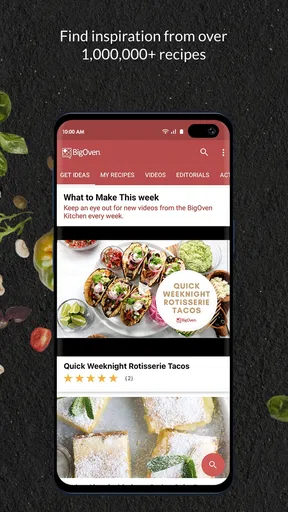
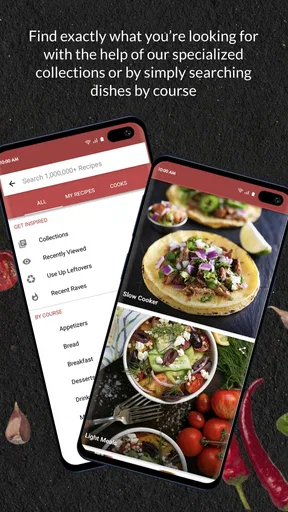
Upon opening the app, you’re greeted with a vast library of over 500,000 recipes. Yes, you read that right. Whether you’re craving a spicy Indian curry or a simple pasta dish, BigOven has got your back. The search feature is super handy, allowing you to filter recipes based on dietary preferences, meal types, or even specific ingredients you have on hand.
The Magic of Meal Planning
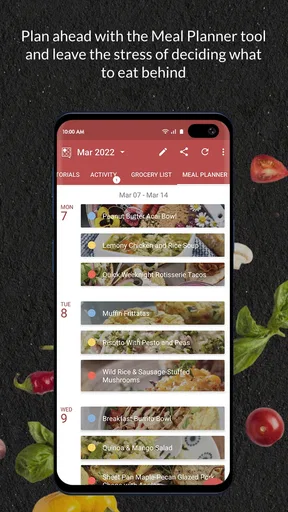
One of the standout features of BigOven is its meal planner. For those of us who struggle with planning meals for the week, this feature is a game-changer. You can easily drag and drop recipes into your meal plan, making it simple to organize breakfast, lunch, and dinner for the entire week. Plus, it syncs across devices, so you can check your plan on your phone, tablet, or computer.
And let’s not forget the grocery list feature. As you add recipes to your meal plan, BigOven automatically generates a shopping list. No more scribbling down ingredients on scraps of paper or forgetting key items at the store. The list is categorized by aisle, making your shopping trips efficient and stress-free.
Community and Inspiration
What really sets BigOven apart is its community aspect. You can follow other users, share recipes, and even see what your friends are cooking. It’s a great way to find inspiration and discover new dishes. I’ve tried a few community-recommended recipes, and let’s just say my taste buds were not disappointed.
If you’re feeling particularly adventurous, the “Use Up Leftovers” feature might be your new go-to. Simply enter the ingredients you have on hand, and BigOven will suggest recipes you can make. It’s like having a personal chef who knows exactly what’s in your fridge.
User Experience and Design
The developers have clearly put a lot of thought into the user experience. The app is visually appealing, with vibrant images that make you want to immediately start cooking. Navigation is smooth, and the app doesn’t lag or crash, which is a huge plus in my book. The integration of social features like comments and ratings adds an interactive element that’s fun and engaging.
For me, the best way to keep all of this useful is to make one small routine out of it: decide on a few meals, review the generated groceries, and then adjust the list before shopping. That helps the planner stay practical instead of becoming a collection of recipes I liked the look of but never intend to cook. I would also start with a manageable plan rather than filling every meal slot immediately; a plan that leaves room for leftovers and changing schedules is more realistic than one that assumes every day will go perfectly.
Final Thoughts
In a world where we’re constantly looking for ways to save time and simplify our lives, BigOven Recipes & Meal Planner checks all the boxes. It’s like having a culinary assistant right at your fingertips. Whether you’re planning meals, discovering new recipes, or just trying to figure out what to do with that lonely zucchini, BigOven is there to help.
So, if you’re ready to take your cooking game to the next level, give BigOven a try. It’s more than just a recipe app; it’s a whole community of food lovers ready to inspire and support your culinary adventures. Happy cooking!
Verdict
Strengths of BigOven Recipes & Meal Planner
- Extensive recipe database with diverse cuisines.
- User-friendly interface for easy navigation.
- Meal planner feature simplifies weekly prep.
- Shopping list syncs seamlessly with recipes.
- Community feature for sharing and discovering.
Limitations of BigOven Recipes & Meal Planner
- Requires an account to access full features.
- Some features locked behind a paywall.
- Occasional ads in the free version.
- Limited offline access without premium.
- No direct integration with grocery apps.
Similar Picks in This Category
View All
Rappi: Food Delivery, Grocery
Rappi, Inc - Delivery3.5

McDonald’s: Cupons e Delivery
Arcos Dorados4.3

Swiggy: Food Instamart Dineout
Swiggy4.7

Blinkit: Groceries & more
Blinkit4.8

foodpanda: food & groceries
Foodpanda GmbH a subsidiary of Delivery Hero SE4.0

Zomato: Food Delivery & Dining
Zomato4.7
Frequently Asked Questions
What features does BigOven Recipes & Meal Planner offer?
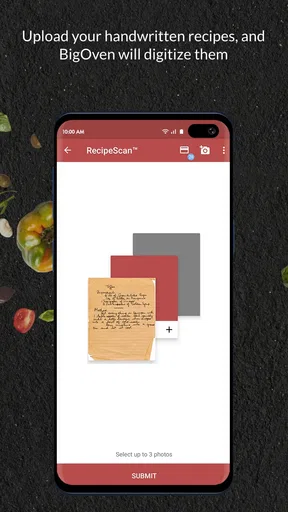
BigOven provides a comprehensive suite of features including a recipe database with over 500,000 recipes, a meal planner, a grocery list generator, and the ability to store personal recipes. It also offers a feature to help reduce food waste by suggesting recipes based on ingredients you have at home.
Is BigOven Recipes & Meal Planner free to use?
BigOven offers both free and premium versions. The free version includes access to a large collection of recipes and basic meal planning tools. However, the premium version, known as BigOven Pro, offers additional features like advanced search filters, nutritional analysis, and an ad-free experience.
Can I use BigOven on multiple devices?
Yes, BigOven is available on both Android and iOS devices, and it also offers a web version. Users can sync their accounts across multiple devices, ensuring that their recipes, meal plans, and grocery lists are accessible wherever they are.
How does the meal planner work in BigOven?
The meal planner allows users to schedule meals for the week or month by adding recipes directly to a calendar. This feature is designed to help users organize their cooking schedule and streamline grocery shopping, as it can automatically generate a shopping list based on the planned meals.
Does BigOven support dietary preferences and restrictions?
Yes, BigOven supports various dietary preferences and restrictions. Users can filter recipes by diet type, such as vegetarian, vegan, gluten-free, and more. The app also allows users to input specific ingredients they want to include or avoid, ensuring that meal planning aligns with their dietary needs.
